
Review and undo writes
See how many rows an UPDATE or DELETE will really change, then undo it in one click.
The review before a risky write
When you run a single UPDATE or DELETE in the query editor, Querly opens a review if the write is risky: it has no WHERE clause, it targets a large table without pinning exact keys, the connection is tagged Production, or the connection has Safe Mode on.
- The real count. Querly counts the rows the statement matches and, for an UPDATE, how many would actually change. A row that already holds the new value is not counted as a change.
- A sample. The first rows that will change, with each changed column shown as
old → new. When a new value needs a function call, such asnextval(), it is shown as "computed on write" instead of being evaluated. - Type to confirm. With no WHERE clause, on Production, or at 1,000 changed rows or more (configurable), the button stays disabled until you type the table name.
Counting runs in the background with a two-second budget. If the database can't count in time, the review says so instead of guessing.
Undo after the write
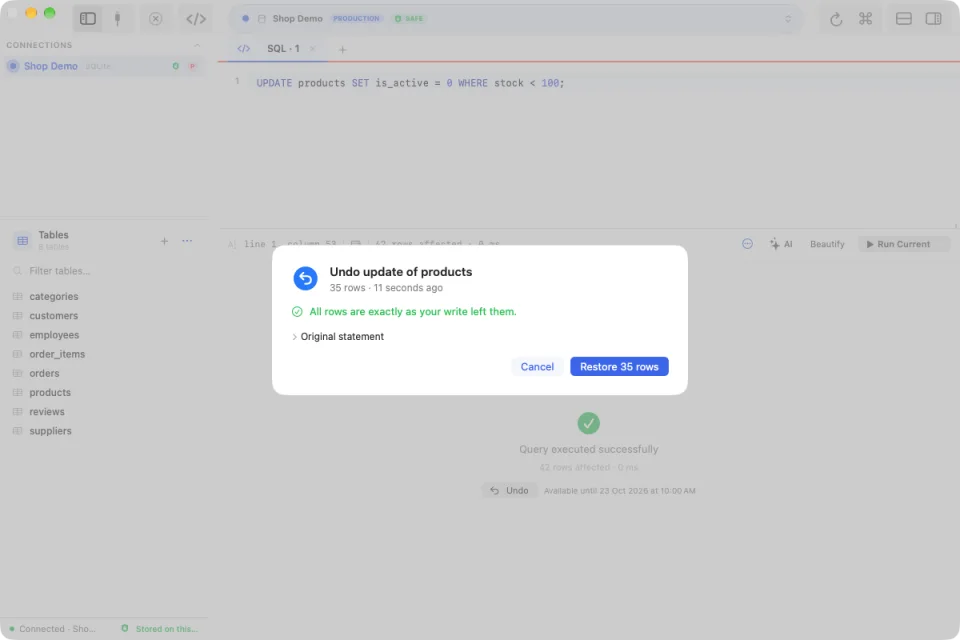
With a licence, Querly keeps a snapshot of the rows a write changes. After it runs, the result shows Undo. Undo first re-reads those rows and shows what changed since:
- Rows exactly as your write left them are restored.
- Rows someone changed after your write are skipped by default. You can choose to overwrite them.
- Rows deleted since can't be restored by an UPDATE and are reported.
The restore runs in one transaction: if anything fails, nothing is restored. Grid saves that only edit rows, or only delete rows, get the same Undo from the success message. Edit → Undo Last Write (⌥⌘Z) and Edit → Write History open it later.
What Undo covers
- SQLite, PostgreSQL, and MySQL/MariaDB with InnoDB tables. SQL Server shows the review but not Undo yet.
- One UPDATE or DELETE on one table, with a primary key (SQLite can use
rowid). Joins,UPDATE … FROM,ORDER BY/LIMITon a write, and multi-statement scripts keep the classic confirmation. - Up to 10,000 changed rows, and values up to 8 KB. Binary columns are not restored from their text form.
- Only the target table: rows removed by cascades or changed by triggers are not restored.
- Auto-commit runs. Inside a manual transaction, Undo is unavailable because a later ROLLBACK would make the snapshot wrong.
Where snapshots live
Snapshots stay on your Mac, encrypted with AES-256-GCM. The key is kept in the Keychain. They are deleted after 72 hours by default (24 hours or 7 days in Settings → Safety → Undo for Writes), and Clear Undo History removes them at once.
The review is part of free Querly. Undo is included with a licence.