

Last updated
TablePlus is one of the most popular database clients on the Mac, and for good reason: it’s native, fast, and polished. Querly is a newer native Mac client with a narrower focus: a careful editing workflow, a keyboard-first interface, and a lower one-time price.
This page compares them so you can decide in five minutes. We start with the cases where you should keep TablePlus.
The short answer
Choose Querly if you work with PostgreSQL, MySQL/MariaDB, SQLite, SQL Server, or Redis on a Mac, you want every edit gathered in one place and previewed as SQL, and you’d rather pay $29 once.
Keep TablePlus if you need MongoDB, Oracle, Cassandra, BigQuery, ClickHouse, or another engine Querly doesn’t support; if you need the same tool on Windows, Linux, or iOS; or if you rely on TablePlus plugins.
At a glance
| Querly | TablePlus | |
|---|---|---|
| Runs on | Mac (macOS 14+) | Mac, Windows, Linux, iOS |
| PostgreSQL, MySQL, MariaDB, SQLite, SQL Server, Redis | ✅ | ✅ |
| CockroachDB, Redshift, Vertica | ✅ (through the PostgreSQL protocol) | ✅ |
| MongoDB, Oracle, Cassandra, BigQuery, ClickHouse | ❌ | ✅ |
| Review edits before saving | ✅ | ✅ |
| Safe mode for production | ✅ | ✅ |
| Plugins | ❌ | ✅ (JavaScript, beta) |
| Free version | 3 saved connections, 2 tabs, 2 windows, unlimited filters | 2 tabs, 2 windows, 2 advanced filters |
| Price | $29, one time | $99, one time |
| Updates included | 1 year | 1 year |
1. Native feel and speed
Both apps are native, and both are fast. Neither runs a Java runtime or a bundled browser, so both open almost instantly on a modern Mac.
Querly is built with SwiftUI and AppKit and is Mac-only by design. That lets it follow Mac conventions closely: standard menus, system light and dark mode, Apple Shortcuts, and deep links.
TablePlus covers more platforms. If your team also uses Windows and Linux, one tool everywhere is a real advantage.
Verdict: a tie on speed. Querly if you’re Mac-only; TablePlus if you need cross-platform.
2. Editing safety
Both apps stage your edits before they reach the database, and both offer a safe mode for production connections. The difference is in how Querly presents and guards the change:
- One pending-changes drawer. Inserts (green), updates (orange), and deletes (red strikethrough) appear together. You read the combined SQL, then ⌘S commits the whole batch.
- Safe Mode per connection. When it’s on, every change, including
UPDATEandDELETEstatements typed in the SQL editor, is shown as SQL and waits for you to confirm it. - Read-only connection mode for when you only want to look.
- Tables without a primary key are read-only, with a clear banner. Querly won’t guess which row you meant and update several.
- Environment badges. Mark a connection as Production and its window is tinted, so you always know where you are.
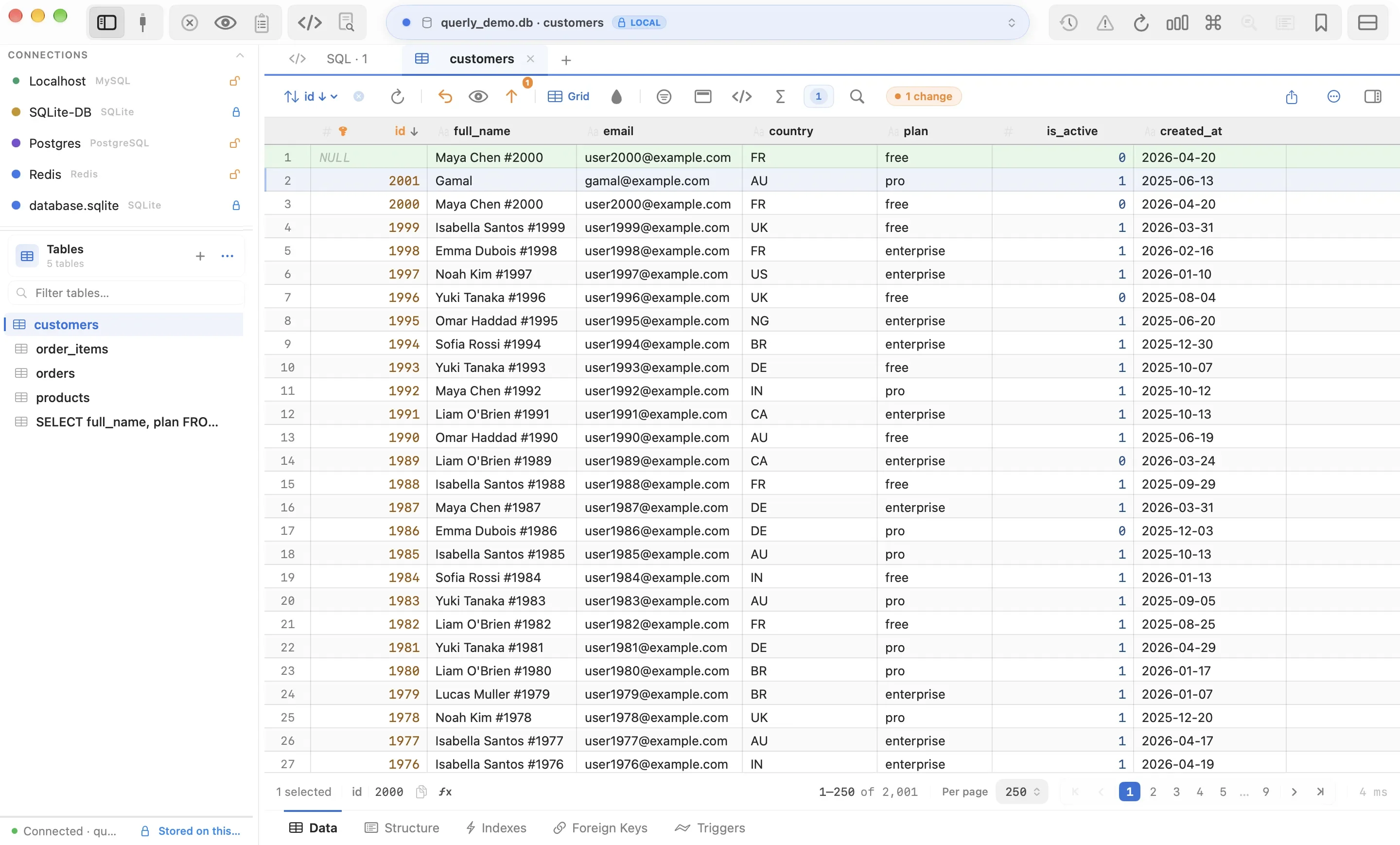
Verdict: both are careful. Querly if you want every change reviewed in one place before it runs.
3. Keyboard workflow
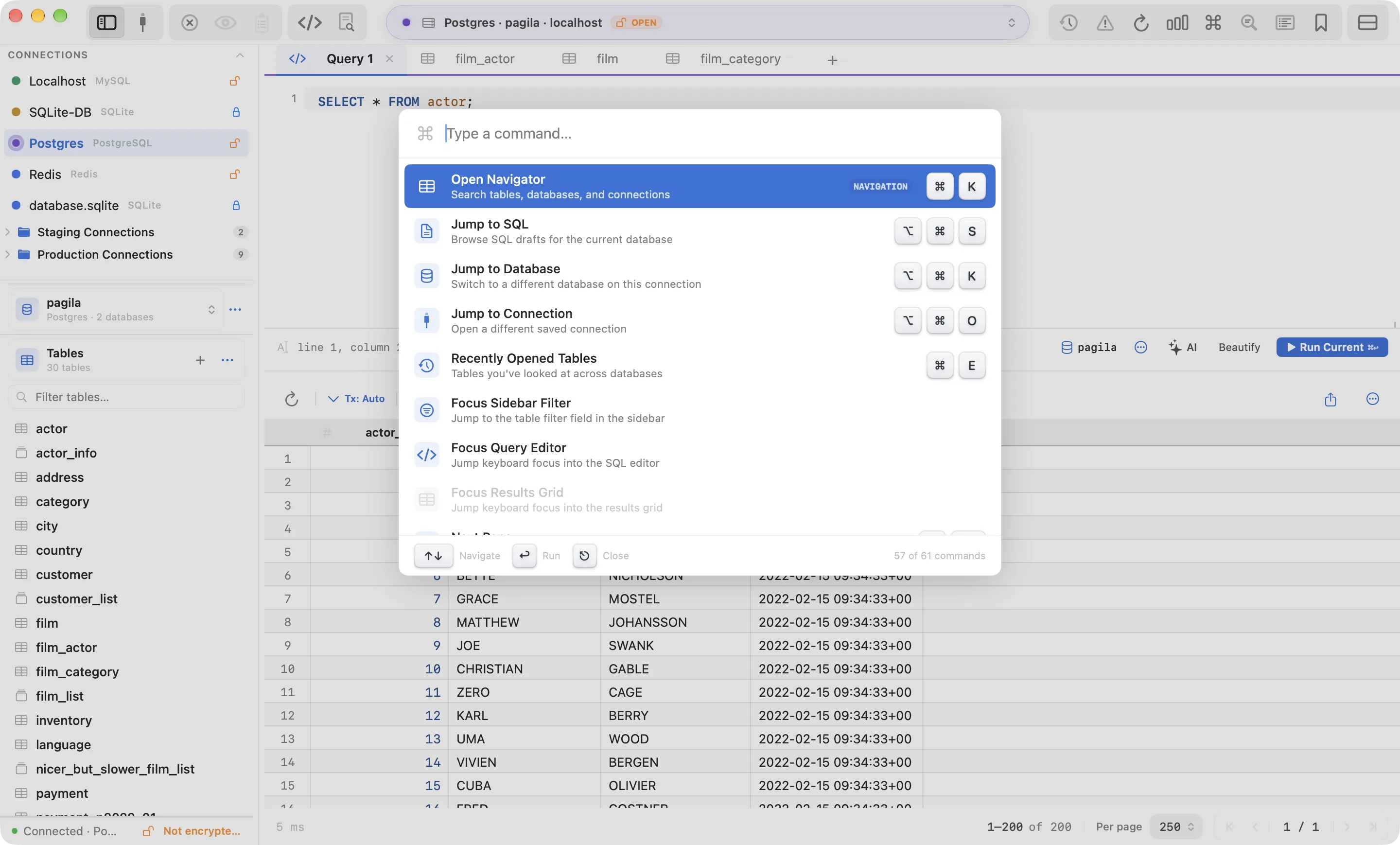
Querly is designed so you rarely need the mouse:
| Action | Querly shortcut |
|---|---|
| Command palette (every action) | ⌘P |
| Jump to table | ⌘K |
| Jump to database | ⌥⌘K |
| Recent tables | ⌘E |
| Jump to column | ⇧⌘J |
| Row inspector | Space |
| Run statement | ⌘↩ |
| Format SQL | ⇧⌥F |
| Commit changes | ⌘S |
Coming from TablePlus? Choose the TablePlus shortcut preset in Settings → Shortcuts and your muscle memory keeps working. VS Code and JetBrains/DataGrip presets are included too.
The SQL editor has schema-aware autocomplete, multi-cursor editing (⌘D,
⌘⇧L, ⌥-click), live templates (sel + Tab), error underlines, EXPLAIN
with a plan tree, and cancels running queries on the server when you
press Esc.
Speed and autocomplete work together. Suggestions come from Querly’s
local copy of your schema, so they appear as you type instead of waiting on
the server, even on databases with hundreds of tables. They cover tables,
columns, aliases, and JOIN targets.
4. Database engines
TablePlus supports more engines. If you use MongoDB, Oracle, Cassandra, BigQuery, or ClickHouse, keep TablePlus.
Querly supports:
- PostgreSQL, with its own Swift implementation of the wire protocol, TLS, and SCRAM authentication
- MySQL and MariaDB
- SQLite: open
.sqliteand.dbfiles from Finder - SQL Server and Azure SQL
- Redis: key browser, filters, value inspector
- CockroachDB, Redshift, Vertica through the PostgreSQL protocol
DuckDB is on Querly’s roadmap. MongoDB is not planned.
Verdict: TablePlus.
5. Schema tools
Querly includes these in every version, free or paid:
- ER diagram generated from foreign keys
- Schema diff between two connections, with migration SQL
- Visual query builder that works out JOINs from foreign keys
- Table designer with a live DDL preview
- Structure tabs for columns, indexes, foreign keys, and triggers
6. Privacy
Querly needs no account and sends no telemetry or analytics. Your data and queries never pass through our servers. The app goes online only to check your licence and look for updates. Passwords are stored in the macOS Keychain. The optional AI error explanation only runs when you ask for it, with your own API key.
7. Copy and customise
Copy exactly what the next tool needs. Choose what ⌘C produces in
Settings: tab-separated for spreadsheets, CSV, INSERT statements, JSON, a
Markdown table, or plain values separated by newlines, spaces, or commas.
Right-click → Copy Special covers one-off formats without changing the
setting.
Make it yours. In Settings you choose the theme (System, Light, Dark, WebStorm), grid and editor font size, alternate row colours, how NULL is shown, which buttons sit in the top toolbar and in what order, and every keyboard shortcut, with presets for macOS, VS Code, TablePlus, and JetBrains.
8. Built for Laravel developers
Querly recognises a Laravel database on its own, from its migrations
table, and turns on extras that stay off for every other database:
- Import a project in one click. The Welcome screen lists the Laravel
projects on your Mac (in
~/Herd,~/Code, and similar folders). Querly reads.env, includingDB_URLand Laravel Sail’s Docker hosts. - Soft deletes handled. Rows with
deleted_atset are hidden by default; one click shows them. - Links Laravel apps don’t declare.
user_idopens the matching row inuserseven without a foreign key, and a polymorphiccommentable_type+commentable_idpair opens the right table. - Readable casts. Enum columns show the case name (
2 · Shipped), encrypted columns show 🔒, and failed-job payloads lead with the job class. - Code you can paste. Copy rows as a PHP array for a seeder, or copy the current filter and sort as an Eloquent query.
- Project tools. Open a table’s Eloquent model, generate a migration and
model from a table, and preview pending migrations as SQL with
migrate --pretendbefore you run them.
See Querly for Laravel developers.
9. Price
| Querly | TablePlus | |
|---|---|---|
| Free version | 3 saved connections, 2 tabs, 2 windows, unlimited filters | 2 tabs, 2 windows, 2 advanced filters |
| Price | $29, one time | $99, one time |
| Covers | 1 person | 1 device |
| Updates included | 1 year | 1 year |
| Subscription | No | No |
Both free versions have no time limit and allow 2 tabs and 2 windows open at once. Free Querly keeps 3 saved connections and has no limit on filters; TablePlus allows 2 advanced filters. Querly’s $29 licence also adds Undo for UPDATE and DELETE, Schema Diff, and write access for AI agents.
Both licences work the same way too: pay once, keep the app forever, and get 1 year of updates. After that, renew only if you want newer versions. Querly costs less than a third as much.
Switching from TablePlus takes two minutes (passwords included)
- Install Querly from the download page, or with Homebrew:
brew install --cask quietkit/tap/querly - On the Welcome screen, choose Import Connections → TablePlus → Import from This File. Querly shows which connections it found, which you already have, and copies their saved passwords from your Keychain after macOS asks you to allow it.
- In Settings → Shortcuts, choose the TablePlus preset.
You can keep both apps installed and try them on your own databases.
Final verdict
| You need… | Choose |
|---|---|
| Postgres, MySQL, MariaDB, SQLite, SQL Server, or Redis on a Mac | Querly |
| Every edit reviewed in one place before it runs | Querly |
| ER diagram, schema diff, and query builder in one app | Querly |
| Laravel-aware browsing (soft deletes, casts, Eloquent) | Querly |
| A lower one-time price | Querly |
| MongoDB, Oracle, Cassandra, BigQuery, ClickHouse | TablePlus |
| Windows, Linux, or iOS | TablePlus |
| Plugins | TablePlus |
Competitor details come from the TablePlus website in October 2026 and may have changed since. Spotted a mistake? Email [email protected].
TablePlus is a trademark of its owner. This comparison is independent and not affiliated with or endorsed by TablePlus.